Showing posts with label Management. Show all posts

Saturday, August 23, 2014

15+ Essential Tips for Civil Engineers regarding quality of construction

Do you know what? in the field site engineer is acting like a soldier fighting for the betterment of the construction quality. Ensuring construction quality is like ensuring good taste in food to make it tasty for the ones who are going to eat it. Quality of construction has many diversified aspects that has to be ensured and remembered by civil engineers working in the site. 

15+ Essential Tips for civil engineers regarding quality of construction

How to Define Quality in Construction?

In this particular state you might be wondering what do we mean by quality in construction. So hang on there here comes the genuine definition;
Quality can be defined as meeting the legal, aesthetic and functional requirements of a project. Requirements may be simple or complex, or they may be stated in terms of the end result required or as a detailed description of what is to be done. But, however expressed, quality is obtained if the stated requirements are adequate, and if the completed project conforms to the requirements. 
the Construction Industry Defines Quality as;
In the construction industry, quality can be defined as meeting the requirements of the designer, constructor and regulatory agencies as well as the owner. 
Civil Engineers Working on site 

Legal Definition of Quality

You know what, quality is not just meant for betterment of the construction, it has a legal existence that bounds both the parties to ensure it; here is how law defines importance of quality in construction; 

Law defines quality in terms of professional liability, a legal concept that requires all professionals to know their trade and practice it responsibly. Every architect and engineer who offers his or her expertise to owners is subject to professional liability laws. 

What to do in quality of construction?

Meeting the requirements of the owner as to functional adequacy; completion on time and within budget; life-cycle costs; and operation and maintenance. 

Quality of Construction
Meeting the requirements of the design professional as to provision of well-defined scope of work; budget to assemble and use a qualified, trained and experienced staff; budget to obtain adequate field information prior to design; provisions for timely decisions by owner and design professional; and contract to perform necessary work at a fair fee with adequate time allowance. 


Meeting the requirements of the constructor as to provision of contract plans, specification and other documents prepared in sufficient detail to permit the constructor to prepare priced proposal or competitive bid; timely decisions by the owner and design professional on authorization and processing of change order; fair and timely interpretation of contract requirements from field design and inspection staff; and contract for performance of work on a reasonable schedule which permits a reasonable profit.
Maintaining the quality of construction during working

Meeting the requirements of regulatory agencies as to public safety and health; environmental considerations; protection of public property including utilities and conformance with applicable laws, regulations codes and policies. 


1. Lapping is not allowed for the bars having diameters more than 36 mm.
2. Chair Spacing maximum spacing is 1.00 m or 1 No per 1 square meter
3. For dowels rod minimum of 12 mm diameter should be used
4. Chairs minimum of 12 mm diameter bars to be used.
5. Longitudinal reinforcement not less than 0.85 and more then 6% of Gross cross sectional area.
6. Minimum bars for square column is 4 No’s and 6 No’s for circular column.
7. Main bars in the slabs shall not be less than 8 mm High Yield Strength Deformed Steel or 10 mm (Plain Bars) and the distributors not less than 8 mm and not more than 1/8 of slab thickness.
8. Minimum thickness of slab is 125 mm.
9. Dimension tolerance for cubes + 2 mm.
10. Free fall of concrete is allowed maximum to 1.50 m.
11. Lap slices not be used for bar larger than 36 mm.
12. Water absorption of bricks should not be more than 15 %.
13. PH value of the what should not e less than 6
14. Compression strength of Bricks is 3.5N / square millimeter
15. In Steel reinforcement binding wire required is 8 kg Per MT.
16. In Soil filling as per IS Code, 3 samples should be taken for core cutting test for every 100 square meter.

Other People are searching for;


  • quality of construction q4
  • quality of construction materials
  • quality of construction rating
  • quality of construction bpo
  • quality of construction appraisal
  • quality of construction q3 q4
  • quality of construction q3
  • current digest construction


Wednesday, August 20, 2014

How to install Primavera P6 Project Management?

Primavera P6 is the latest software package that is used for comprehensive enterprise project portfolio management (EPPM) solutions. Primavera was founded by Primavera Systems Inc. in 1983 which is then acquired by Oracle Corporation in 2008.

Installation of Primavera is a bit tricky but not very difficult at all. In this post I am going to share the procedure that how one can install Primavera P6. Installation procedure is similar for Windows 7 and Windows 8.  Don’t worry if you are using windows XP and other related operating systems. This installation guide will work for each and every of famous operating systems.

Step # 1: Download Primavera P6 ISO File and MagicISO Virtual CD/DVD manager


First Download both the files from the link below i.e. both ths PS.iso file and MagicISO Virtual CD/DVD manager


Step# 2: Install the MagicISO Virtual CD/DVD Manager 


 Installation of this package is very simple and straight forward
1) Run the “iso software..setup_magicdisc106.exe” setup

Run the ISO MagicDisk ISO Virtual CD/DVD Manager (Click to enlarge)

2) Click Next Button 3 times
3) Click Finish and you are done

Step#3: Mount the P6.ISO  disk file in virtual CD/DVD MagicDisc


1) Right Click the p6.iso file and click Mount as shown;
Mount the Disc (click to enlarge)

2) Wait for a while until the disk is mounted and a new window is displayed as shown below containing all the files in the P6.iso file;
Mounted disc (Click to enlarge)


Step#4 Install the Primavera P6 software package


1) Double click the setup.exe file to run the Primavera P6 setup as shown; (Click Yes if systems prompts for security assurance)
Initializing the Primavera Setup (Click to enlarge)

2) Click Next
3) Enter “EC-C01” as Product Code in the setup as shown;
Insert the License Code (Click to enlarge) 

4) Select “I accept the terms of License agreement ” and click Next
5) In the Setup Type Select Primavera Stand-alone and Click Next as shown;
Stand-alone type setup (Click to enlarge)

6) Select the Destination Folder (Recommended “C:\Primavera”) and Click Next
7) Click Next in the common files destination folder
8) Tick Mark Sample Project if you want to install Sample Projects and Click Next as shown;
Install Sample Project (Click to enlarge)

9) Click Next in the Program Shortcut folder
10) In the license selection part; Click Browse and Locate the “license.txt”  in the License folder of the Disk mounted as shown;
Locate the License file (Click to enlarge)

11) Click Next
12) Click Install
13) Wait a while for the setup to work and install necessary files
         a. Microsoft SQL Server 2005
14) If during the setup error occurs “could not write value to key \SOFTWARE….” Click Ignore as shown;
Error during installation (Click to enlarge)

15) In the database configuration;
        a. Click Next
        b. Click Finish
        c. Click Next
        d. Click Finish
16) Click Finish and you are done.
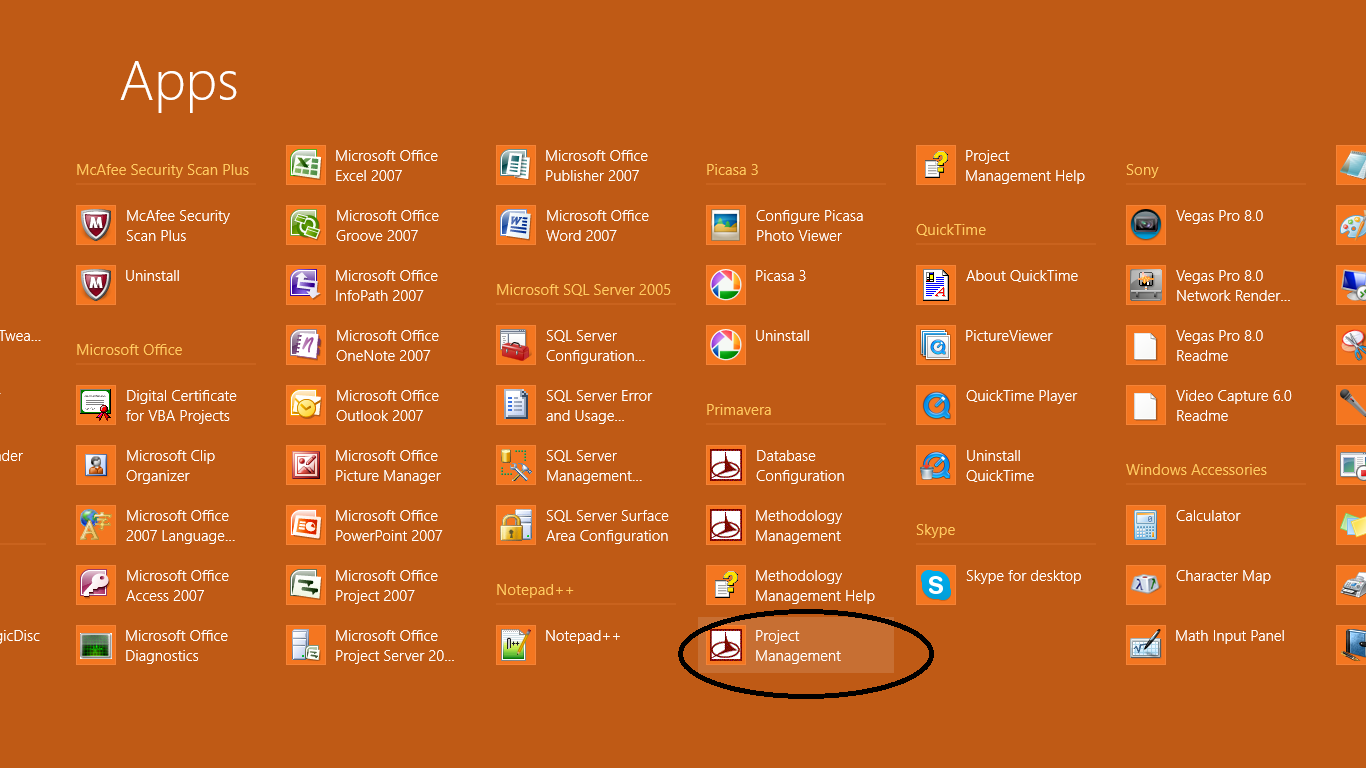
17) Open the project Management Module from the Apps or from start menu as shown;
Apps (Click to enlarge)

18) If you get an error while launching Primavera P6 about “Error: Couldn’t Locate the language file” and a Runtime Error don’t worry proceed as follows;

        a. Locate the language file at the following location: C:\Program Files\Common Files\Primavera Common\Languages
       b. Copy the Language folder and paste it to the following location: C:\Program Files\Primavera\Project Management\Languages\comCaptions.en-us

19) In the Login and Password enter admin in both, and hit OK
Login to Primavera (Click to enlarge)

20) If you get an error “Licensed named users is less than configured Named user” ignore it and Hit Ok
21) You will be taken to the Primavera Home Screen as shown;
Graphical User Interface (Click to enlarge)

22) Go the Admin Menu at the top menu bar and click Users as shown;
Admin Menu (Click to enlarge)

23) In the Users Dialog go to the Licensing Tab as shown;
licensing tab (Click to enlarge)

24) Uncheck all the checkboxes in the Named User Column and Just Check the Project Management in the concurrent User column as shown;
Project Management (Click to enlarge)

25) Click Close;
26) Now Close Primavera so that settings can be saved and restart Primavera and you are done with installation.
27) Right click the Mounted Disk and Click Eject to unmout the mounted disk.


From Editor's Desk:


I hope this installation guide for Primavera P6 will help you in installation and don't forget to share it with your friends and give us feedback. If you have any other problem during installation comment below. 


Tuesday, August 19, 2014

Download Primavera P6 Free Full Licensed - Civil Engineering Softwares

Civil Engineering has projects that include large number of activities, excess amount of resources in terms of labor, machinery, time and tools. All these activities are to be managed. Planning engineer first has to perform work break down Structure (WBS) and then allocate resources and time to it.

With the induction of softwares in the field of civil engineering the software companies have also taken this face in their plan to develop a software for project management, resource leveling etc.

Download Primavera P6 free full licensed 

History of Primavera


Primavera Graphical User Interface (click to enlarge)


Primavera P6 is the latest software package that is used for comprehensive enterprise project portfolio management (EPPM) solutions. Primavera was founded by Primavera Systems Inc. in 1983 which is then acquired by Oracle Corporation in 2008.

What is Primavera?

Primavera is not a project manager it only performs the calculation for you, project manager has to visualize the project activities, duration, their dependencies etc and then input all this into Primavera. Primavera will then perform network calculations by PERT (Program Evaluation and Review Technique) after which the critical path, duration of project and estimated cost based on the cost and time of the activities is generated.

Usage of Primavera


Primavera prepares a very useful Gantt Chart and other reports for project manager and it also helps the manager in execution of the project and will tell the authorities how much percentage of the project has been completed in any specific time period.

Why to Use Primavera?

Primavera is being used by mechanical engineers, electrical engineers and civil engineers. Most importantly it is used for civil engineers and almost all the organizations, contractors and consultants demand their planning engineer and project manager to have a know-how of Primavera.

Project management includes very complex network diagrams and calculation of such complex networks which includes; Resource leveling, crashing of activities and other such tasks includes very tedious calculation which is very difficult if you do it by hand, in this condition Primavera can be very handy for you.

Oracle’s Primavera P6 Enterprise Project Portfolio Management (EPPM) is the most influential, full-bodied and easy-to-use key for prioritizing, scheduling managing, supervision and evaluating projects, programs and portfolios.

Softwares under Primavera


Primavera P6 Enterprise Project Portfolio Management
Primavera P6 Professional Project Management
Primavera P6 Analytics
Primavera Portfolio Management
Primavera Unifier
Primavera Contract Management, Business Intelligence Publisher Edition
Primavera Risk Analysis
Primavera Inspire for SAP
Primavera Earned Value Management
Primavera Contractor
Planning & scheduling management
Resource management

 Download Oracle’s Primavera P6


This software package includes a Primavera P6 main .iso file which is to be mounted by using MagicISO Virtual CD/DVD Manager.

The procedure to install Primavera is coming soon so stay tuned. 

Here are the links to download Primavera P6 package and MagicISO


and 

Download Primavera P6 free full licensed 
or 

Note: You must have to download Both the files and find the reason in the installation guide coming soon.

Keywords for Primavera P6

Download primavera p6 professional project management
free download primavera software full version
free download primavera p6 software
download primavera p6
download primavera software
download primavera p6 for mac
download primavera p6 video training
download primavera project planner

Disclaimer:


The Software name and its title and all the things in it are the trademark of respective owner/author, we here on iamcivilengineer doesn’t host the book neither uploaded it we are just sharing here the links to download; and are just for sharing it for student and education purpose; if you have any problem about this link or Software you can contact us via contact us page or email at admin@iamcivilengineer.com

Your Feedback


I hope you will like this sharing; stay tuned for the remaining updates about this topic; and don’t forget to share it to your friend and buddies on facebook, twitter and gplus. -


Friday, August 1, 2014

Download MS Project Full Project Management Software for MS Office

Project Management in general or construction management in particular is a very significant and important part of any civil engineering projects that includes labour, activities that has specific duration and some resources like machinery or time as well. A project by  a particular definition can be defined as;


What is Project

A project is a set of connected activities that have duration and a single goal that has to be completed in time and according to specification.


What is Project Management


Typical Project Management includes following;
•    Work breakdown structure
•    Project network of activities
•    Critical path method (CPM)
•    Resource management
•    Resource leveling
•    Risk assessment

Different techniques are employed to do the management in a project like PERT (program Evaluation and Review technique) method, CPM (critical Path Method). These all techniques include lengthy calculation and are very hectic to do that by hand.

Project Management and MS Project


So for our ease different companies have made Project Management tools like Primavera by Oracle and MS Project by Microsoft. They have a very easy to use interface where you can solve the network diagrams on a single click and generate important reports like gantt chart etc. Also you can perform typical project management activities like Scheduling and Crashing of activities etc.
In this post I am sharing with you very basic and easy to use software for project management i.e. Microsoft Project 2007 or MS Project 2007 it is a MS Office by part that comes with variety of diversity and functionality.


MS Project and Civil Engineering


In field of civil engineering both softwares are used i.e. Primavera and MS Project but most companies prefers Primavera which is a bit professional than MS office. But before you go to learn Primavera its very handy to learn MS Project for your basic knowledge.

MS project sometimes referred as MS Office Project is an Office compatible Project Management tool that helps users to set realistic goals for project teams and customers by creating schedules, distributing and assigning project resources, managing budgets. It helps you in generating reports and charts. MS Project comes with customizable wizard that walks users through the process of Project creation, from assigning their task and resources to reporting the final results.
Typical Gantt Chart in MS Project 2007

About the download (MS Project 2007)


This download includes 485 MB *.Zip file that has the main setup file along with the Serial Numbers and Keygen that is required.
The version of the software is 2007 so you might need MS Office 2007 installed. This version is the most stable version than others like 2010 and 2013, we will be sharing them soon as well.

Keywords for Download MS Project


free download ms project 2010 full version, download ms project 2007, download ms project 2010, 
download ms project 2010 standard, download ms project 2003,free download ms project 2003,download ms project 2007 trial version, download ms project viewer

Download MS Project 2007 Full


To download MS Project 2007 full click the following button.
Click here to download

From Editor's Desk

The Software name and its title and all the things in it are the trademark of respective owner/author, we here on iamcivilengineer doesn’t host the Software neither uploaded it we are just sharing here the links to download; and are just for sharing it for student and education purpose; if you have any problem about this link or Software you can contact us via contact us page or email at admin@iamcivilengineer.com

Your Feedback

I hope you will like this sharing; stay tuned for the remaining updates about this topic; and don’t forget to share it to your friend and buddies on facebook, twitter and gplus.


Monday, July 21, 2014

Download Free Civil Engineering Illustrated Source Book [PDF]

The purpose of this source book is to provide the user with an all-inclusive overview of the general pattern of civil engineering as it is practiced by private consulting firms
Download Civil Engineer's Illustrated SourceBook

Author

By; Robert O. Parmley, P.E.

Title

Civil Engineering Illustrated Source Book

Preface


Any engineer entering the profession, seeking a career in the area of private practice, should be mentored by a well-seasoned professional. But, in today’s world of specialists, there are fewer general practioners in civil engineering who are well versed in the full aspect of consulting engineering.  When you do find one, that individual most often is too busy to devote much time to training entry-level personnel. Therefore, the novice engineer is at a basic disadvantage. Being well trained and educated is not sufficient to pursue a career in consulting engineering. One must also have adequate, practical experience. The licensing laws of each state, territory and province have experience requirements mandated before issuing a P.E. (Professional Engineer) registration. However, these requirements are broad based. This source book is not intended to supplant any licensing requirement, but rather designed to augment this segment of the engineer’s training.


Table of Contents


PLANNING

Section 1 TECHNICAL REPORTS 1-1

Section 2 PROJECT SCHEDULING 2-1

Section 3 FIELD RECONNAISSANCE, SURVEYING & MAPPING 3-1

Section 4 PUBLIC MEETINGS 4-1

Section 5 REGULATORY APPROVALS 5-1

Section 6 COST ESTIMATING 6-1

DESIGN

Section 7 TITLE SHEET ORGANIZATION 7-1

Section 8 BUILDINGS 8-1

Section 9 WATER SUPPLY & DISTRIBUTION 9-1

Section 10 FIRE PROTECTION 10-1

Section 11 WASTEWATER COLLECTION & TREATMENT 11-1

Section 12 STORM SEWER SYSTEMS 12-1

Section 13 DAMS & RESERVOIRS 13-1

Section 14 STREETS, ROADS & HIGHWAYS 14-1

Section 15 BRIDGES 15-1

Section 16 AIRPORTS 16-1

Section 17 ATHLETIC FACILITIES 17-1

Section 18 TRAILER COURTS & CAMPGROUNDS 18-1

Section 19 RETROFITTING & REHABILITATION 19-1

Section 20 SPECIALIZED PROJECTS 20-1

Section 21 STANDARD DETAILS 21-1

Section 22 SPECIFICATIONS 22-1

BIDDING PROCESS

Section 23 BIDDING DOCUMENTS 23-1

Section 24 ADVERTISING & BID OPENING 24-1

Section 25 CONSTRUCTION CONTRACTS 25-1

CONSTRUCTION

Section 26 PRE-CONSTRUCTION CONFERENCE 26-1

Section 27 SHOP DRAWINGS 27-1

Section 28 SAFETY 28-1

Section 29 INSPECTION & TESTING 29-1

Section 30 CONSTRUCTION STAKING 30-1

Section 31 CLOSE-OUT 31-1

SUPPLEMENTAL

Section 32 TECHNICAL REFERENC

Download Here

To download free Civil Engineering Illustrated Source Book [pdf] 

Keywords to Reach here:

Download Civil Engineering Books, Download Civil Engineering Source book, Download Project Management Books, Download Contracts and Bidding books, Civil Engineering Illustrated

Disclaimer:

The Book name and its title and all the things in it are the trademark of respective owner/author, we here on iamcivilengineer doesn’t host the book neither uploaded it we are just sharing here the links to download; and are just for sharing it for student and education purpose; if you have any problem about this link or book you can contact us via contact us page or email at admin@iamcivilengineer.com

Your Feedback

I hope you will like this sharing; stay tuned for the remaining updates about this topic; and don’t forget to share it to your friend and buddies on facebook, twitter and gplus.

Friday, July 4, 2014

What is Liquidated damages? What are its clauses

Monetary compensation for a loss, detriment, or injury to a person or a person's rights or property, awarded by a court judgment or by a contract stipulation regarding violation of contract.

Definition

Cash compensation, agreed to by signed, written contract for breach of contract, payable to the aggrieved party. {Law Dictionary: (Black's Law Dictionary}

Generally, contracts that involve the exchange of money or the promise of performance have a liquidated damages stipulation. The purpose of this stipulation is to establish a predetermined sum that must be paid if a party fails to perform as promised.

Conditions when Liquidated damages are imposed:

Damages can be liquidated in a contract only if
1)    First, the amount of the damages identified must roughly approximate the damages likely to fall upon the party seeking the benefit of the term.

2)        Second, the damages must be sufficiently uncertain at the time the contract is made that such a clause will likely save both parties the future difficulty of estimating damages.

Difference between liquidated damages and un-liquidated damages (penalty)

At common law, a liquidated damages clause will not be enforced if its purpose is to punish the wrongdoer/party in breach rather than to compensate the injured party (in which case it is referred to as a penal or penalty clause).

A penalty will be imposed if the loss or damage is reasonably certain if it’s uncertain then liquidated damages clause will be imposed.

Examples of liquidated damage

For example, suppose Saad Iqbal agrees to lease a store-front to Zubair Saleem, from which Zubair intends to sell jewelry. If Saad breaches the contract by refusing to lease the store-front at the appointed time, it will be difficult to determine what profits Zubair will have lost because the success of newly created small businesses is highly uncertain. This, therefore, would be an appropriate circumstance for Zubair to insist upon a liquidated damages clause in case Saad fails to perform.

Undisclosed source code has value as a trade secret. Openly publishing the source code destroys the trade secret value. The trade secret value of source code is difficult or impossible to prove. There is no open market for "secret source code".

In the case of construction contracts, courts have occasionally refused to enforce liquidated damages provisions when both parties have contributed to the overall delay of the project.

Saturday, November 9, 2013

10 things construction manager must consider

Are you a project manager or going to manage your projects? if Yes then These ten rules will help improve your construction projects. Are these ten rules the top ten? It is up to your decide, but not take too long. Share these rules with your team. Your team members are sure to help you carry them out.
1. Adopt practices for exploring a variety of perspectives.
Construction managers
 We think we see what we see, but we don’t. We really see what we think. Remember the blind men and the elephant. Make it your habit to inquire what others see. You’ll see more together.
2. Stay close to your customer.
Clients’ concerns evolve over the life of a project. Take advantage of that to over-deliver. Stay in a conversation with your client to adjust what you are doing.
3. Take care of your project team.
We’ve come to accept that the customer comes first the customer is always right. We can’t take care of the customer if we first aren’t taking care of our project team. It’s a challenge. While there are some things we can do for the whole team, it comes down to taking care of each team member as the individual that he or she is. And to make it more difficult, then we must bring their various interests into coherence.
4. Keep your eye on the overall project promises.
Project work can be difficult. It is easy to loose sight of what we are doing and why we are doing it. Remind your team and yourself of the overall promises and how you are doing fulfilling those promises.
5. Build relationships intentionally.
Project teams come together as strangers. To do great work, innovation, learning, and collaboration all take people who like and care for each other. Don’t leave that to chance. Start your projects by building relationships among team members.
6. Tightly couple learning with action.
Projects are wonderful opportunities to learn. Don’t put that off for the after project lessons learned. Make it your habit to incorporate learning loops in all your project activities. Your team will appreciate it. Your customer will benefit from it. And best of all, it will make your job easier.
7. Coordinate meticulously.
A project is an ever-evolving network of commitment. Keep that network activated by tending to the critical conversations. See that people are making clear requests, promises that have completion dates, and share opinions that advance the purposes of the project. Without attention to those critical conversations the project will drift.
8. Collaborate. Really collaborate.
Make it your rule to plan with those people who will be the performers of the plan. Don’t wait until the project has gone south to get their help. Start out that way. Continue collaborating as the usual way you work through the project.
9. Listen generously.
People are able to say what they can in the moment. For the most part, people are well-intended. Give them the benefit of the doubt. Take the time to listen. Ask questions. Seek others’ opinions. And while you’re at it, don’t be so harsh on yourself.

10. Embrace uncertainty.
Expect the unexpected. There is far more that we don’t know and can’t know than what we can anticipate. Be resilient to what life throws at you. Anticipate that your team will learn something along the way that can and should change what you have promised and how you can deliver on your promises. And when you take a set-back – we all do sometime or another – review the other